Base64URL is Base64 adapted for URLs and filenames: plus becomes hyphen, slash becomes underscore, and padding is commonly omitted. JWT uses this URL-safe, unpadded representation for each of its three dot-separated segments.
Compare the alphabets with the same bytes
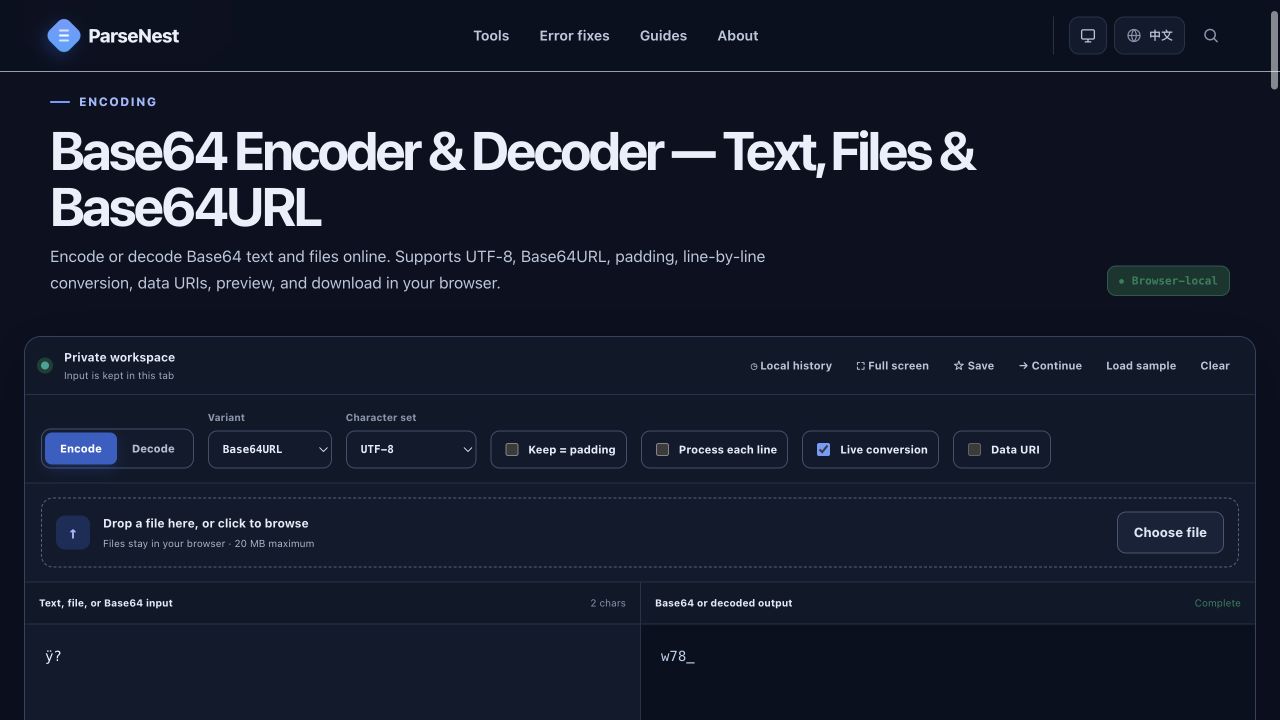
The UTF-8 bytes for ÿ? encode to w78/ in standard Base64 and w78_ in Base64URL. Only the final alphabet character changes; the underlying bytes do not.
UTF-8 input: ÿ?
Standard Base64: w78/
Base64URL: w78_Understand what the equals signs mean
Base64 emits four characters for every three bytes. Padding fills the final four-character block when the input length is not divisible by three. With one leftover byte the encoded value ends in ==; with two it ends in =; with no remainder it needs no padding.
Input length mod 3 = 0  → no padding
Input length mod 3 = 1  → ==
Input length mod 3 = 2 → =Restore padding only when the decoder needs it
A JWT segment may be decoded by replacing the URL-safe alphabet and appending enough equals signs to reach a multiple of four. A length whose remainder is one is malformed and should be rejected rather than repaired blindly.
function decodeBase64Url(segment) {
  if (segment.length % 4 === 1) throw new Error("Invalid Base64URL length");
  const normalized = segment.replace(/-/g, "+").replace(/_/g, "/");
  const padded = normalized + "=".repeat((4 - normalized.length % 4) % 4);
  const bytes = Uint8Array.from(atob(padded), c => c.charCodeAt(0));
  return new TextDecoder("utf-8", { fatal: true }).decode(bytes);
}Use Java 8's URL decoder for JWT segments
java.util.Base64 has separate basic, URL, and MIME variants. Use the URL decoder for JWT header and payload segments; do not pre-process them with the basic decoder.
import java.nio.charset.StandardCharsets;
import java.util.Base64;

String payload = "eyJzdWIiOiIxMjMiLCJleHAiOjE5MDAwMDAwMDB9";
byte[] decoded = Base64.getUrlDecoder().decode(payload);
System.out.println(new String(decoded, StandardCharsets.UTF_8));
// {"sub":"123","exp":1900000000}Verify after decoding
A decoder only reveals attacker-controlled text. Before trusting sub, role, exp, aud, or any other claim, verify the signature with a trusted key, pin the expected algorithm, and validate issuer, audience, time claims, and application authorization on the server.
Base64URL without padding in the tool
The screenshot shows the URL-safe alphabet selected and padding disabled. The result w78_ can be placed in a URL path or query without escaping slash or plus characters.
Choose the matching variant
| Property | Base64 | Base64URL / JWT |
|---|---|---|
| Characters 62 and 63 | + and / | - and _ |
| Padding | Usually retained | Usually omitted in JWT |
| Typical use | Files, email, API bodies | JWT, OAuth, URL parameters |
| Java 8 API | Base64.getDecoder() | Base64.getUrlDecoder() |
- Base64URL changes the alphabet; it does not change the decoded bytes.
- JWT segments normally omit equals padding by design.
- Use a Base64URL decoder instead of assuming the basic Base64 alphabet.
- Reading JWT claims is not signature or authorization verification.