Java 8 includes supported Basic, URL, and MIME Base64 encoders in java.util.Base64. The important choices are the alphabet, padding policy, character set, and whether the data should be buffered in memory or streamed.
Encode and decode UTF-8 text
Convert text to bytes with StandardCharsets.UTF_8 and use the same charset after decoding. This avoids behavior that changes with the machine's default locale.
import java.nio.charset.StandardCharsets;
import java.util.Base64;

String source = "Java 8 Base64 文件示例";
String encoded = Base64.getEncoder()
        .encodeToString(source.getBytes(StandardCharsets.UTF_8));
String decoded = new String(
        Base64.getDecoder().decode(encoded),
        StandardCharsets.UTF_8);

System.out.println(encoded);
System.out.println(decoded);

// SmF2YSA4IEJhc2U2NCDmlofku7bnpLrkvos=
// Java 8 Base64 文件示例Generate a URL-safe value without padding
Use getUrlEncoder rather than replacing characters by hand. Omit padding only when the receiving protocol allows it, as JWT does.
String token = Base64.getUrlEncoder()
        .withoutPadding()
        .encodeToString("ÿ?".getBytes(StandardCharsets.UTF_8));

System.out.println(token);
// w78_Read and write a small file
For test fixtures and small attachments, Files.readAllBytes is simple. The encoded .b64 file contains ASCII text; the restored PDF contains the original binary bytes.
import java.nio.file.Files;
import java.nio.file.Path;
import java.nio.file.Paths;
import java.util.Arrays;
import java.util.Base64;

Path source = Paths.get("report.pdf");
Path encodedFile = Paths.get("report.pdf.b64");
Path restored = Paths.get("report-restored.pdf");

byte[] original = Files.readAllBytes(source);
byte[] encoded = Base64.getEncoder().encode(original);
Files.write(encodedFile, encoded);

byte[] decoded = Base64.getDecoder().decode(Files.readAllBytes(encodedFile));
Files.write(restored, decoded);

System.out.println(Arrays.equals(original, decoded));
// trueStream large files instead of loading them all
Base64 increases size by roughly one third. For large files, wrap the destination or source stream so memory use stays bounded. The decoder stream rejects invalid input while copying.
import java.io.InputStream;
import java.io.OutputStream;
import java.nio.file.Files;
import java.nio.file.StandardCopyOption;

try (OutputStream output = Base64.getEncoder().wrap(
        Files.newOutputStream(encodedFile))) {
    Files.copy(source, output);
}

try (InputStream input = Base64.getDecoder().wrap(
        Files.newInputStream(encodedFile))) {
    Files.copy(input, restored, StandardCopyOption.REPLACE_EXISTING);
}Handle decoder failures explicitly
The basic decoder rejects URL-safe characters, malformed padding, and unrelated characters. Select getUrlDecoder for URL-safe input and getMimeDecoder only for MIME content that legitimately contains line separators. Do not silently strip arbitrary characters from signed or security-sensitive data.
try {
    byte[] bytes = Base64.getDecoder().decode(value);
} catch (IllegalArgumentException exception) {
    System.err.println("Invalid standard Base64: " + exception.getMessage());
}
The Java sample verified in the browser tool
The captured output matches the first Java example character for character. This gives a quick independent check before the value is added to an API test or fixture.
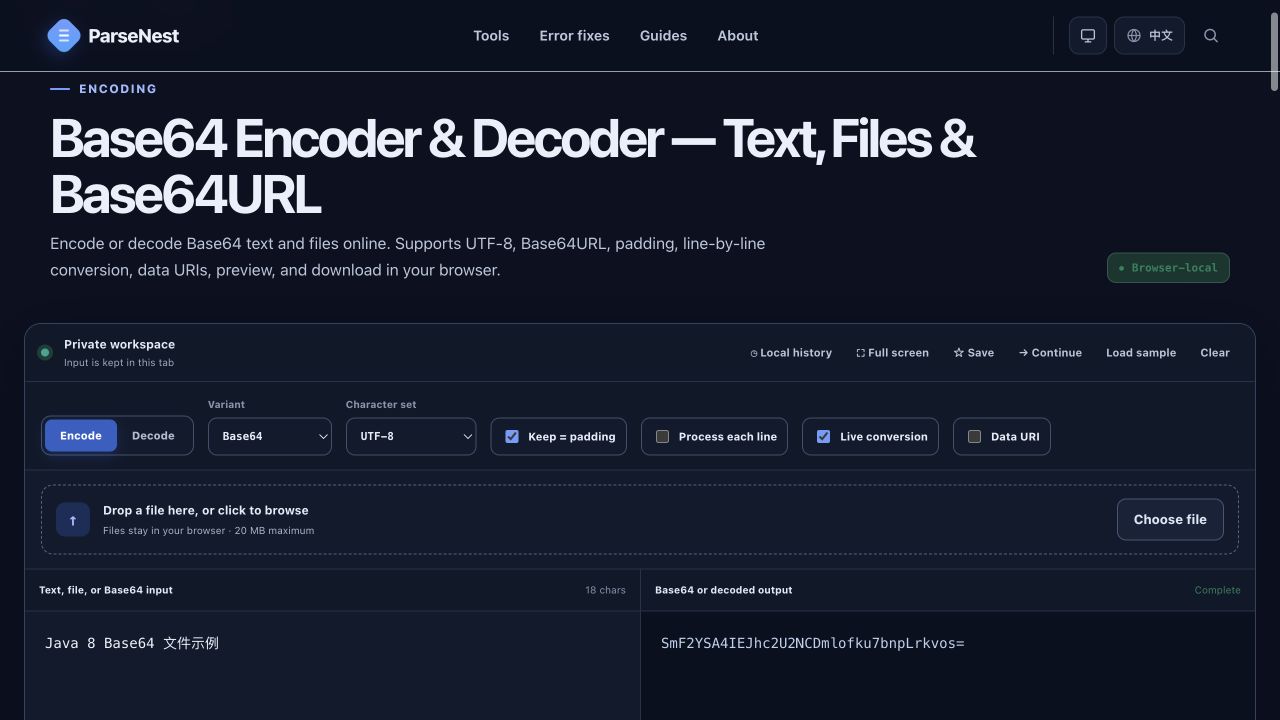
Java 8 encoder and decoder selection
| Data format | Encoder | Decoder | Notes |
|---|---|---|---|
| Standard Base64 | getEncoder() | getDecoder() | Files and compact API values |
| Base64URL | getUrlEncoder() | getUrlDecoder() | URL parameters and JWT segments |
| MIME Base64 | getMimeEncoder() | getMimeDecoder() | Line-wrapped MIME bodies |
| Unpadded URL value | getUrlEncoder().withoutPadding() | getUrlDecoder() | Only when the protocol permits omitted padding |
Java 8-compatible file equality check
Files.mismatch is newer than Java 8, so production Java 8 code should compare a digest or stream the files byte by byte. The SHA-256 comparison below stays within the Java 8 API.
import java.security.MessageDigest;
import java.util.Arrays;

MessageDigest sha256 = MessageDigest.getInstance("SHA-256");
byte[] originalHash = sha256.digest(Files.readAllBytes(source));
sha256.reset();
byte[] restoredHash = sha256.digest(Files.readAllBytes(restored));

System.out.println(Arrays.equals(originalHash, restoredHash));
// true- Use java.util.Base64 and explicit UTF-8 in Java 8 code.
- Choose Basic, URL, or MIME APIs to match the producer's format.
- Stream large files to avoid holding both binary and expanded Base64 data in memory.
- Treat IllegalArgumentException as a format error instead of repairing input silently.